
Yes, you can use Tinder on a PC or laptop. Open tinder.com in any modern browser, sign in with the same account you use on your phone, and you can swipe, match and chat. There is no desktop app to install, and you do not need an emulator.
How to use Tinder in your browser
- Go to tinder.com in Chrome, Edge, Firefox or Safari.
- Click Log in and choose the method you used when you signed up (phone number, Google, Apple or Facebook if your account still uses it).
- Allow location access when the browser asks. Tinder needs it to show people near you.
- Swipe with your mouse, or use the arrow keys: left to pass, right to like, and up for a Super Like.
Your matches, messages and profile are synced with your phone, so you can start a chat on your laptop and continue it on the go.
Why people prefer Tinder on a computer
- Typing is easier. Long, thoughtful replies are much quicker on a real keyboard.
- Bigger photos. You see profiles in more detail before you decide.
- Fewer distractions on your phone. Some people like to keep dating to a set time at their desk.
- Battery and storage. Nothing to install, nothing draining your phone.
The limits of tinder.com
The browser version is solid, but it is not identical to the phone app:
- Some features arrive later or not at all. Newer features often show up on the mobile app first, and a few may never come to the web.
- Location comes from your browser. If your browser or computer has an inaccurate location, your recommendations can feel off. Check that location access is allowed for tinder.com.
- Verification and some settings need the app. Photo verification, for example, usually happens on a phone.
- Notifications are limited. You get browser notifications only if you allow them and the tab or browser is running.
- Still one card at a time. Swiping on the web works just like the app, one profile after another.
Your like limit is the same on every device. Free accounts commonly report around 100 likes per 12 hours, but Tinder changes this and it can vary, so check your app if you keep running out of likes.
What about emulators?
Some guides suggest installing an Android emulator such as BlueStacks to run the Tinder app on Windows. It works, but it is heavy, slow on older laptops, and adds a layer of software between you and your account. Unless you need a feature that only exists in the phone app, the browser is the better choice.
How Spoofy helps
Spoofy is a free companion app for Tinder that works with your existing Tinder account. Besides the Android APK, it has a web app at app.sspoofy.com that runs in any browser, so it works on a Windows PC, a Mac, a Chromebook or even an iPhone. Spoofy is not affiliated with Tinder.
On a big screen, a few features make particular sense:
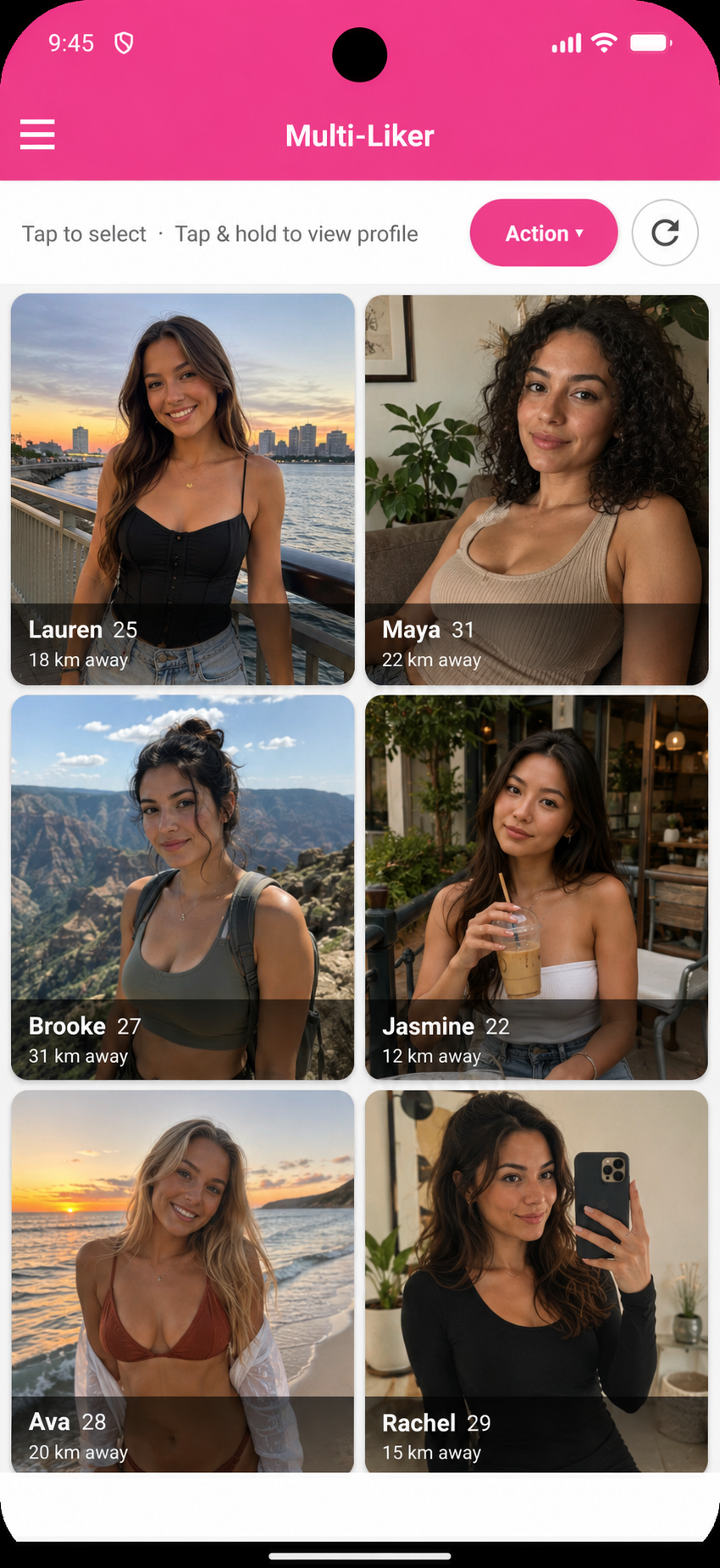
- Multi-Liker: see a whole grid of recommendations at once, flick through photos, and like the ones you pick in one tap. On a laptop screen you can scan a lot of profiles quickly.
- Smart filters: hide profiles without a bio, show only verified or recently active people, require 3+ photos, set distance, or hide bios containing certain phrases.
- Messages and Your turn: see which chats are waiting on you, with your best openers one tap away.
- Opener scoreboard: tracks which first messages get replies, so you can see what works. More in our guide to Tinder opening lines.
- Dark mode: easier on the eyes for late-evening sessions. See Tinder dark mode.
Spoofy does not give you extra likes. Tinder’s limits still apply, and Spoofy shows how many you have left and can alert you when they refill. You sign in with your normal Tinder login, Spoofy never stores your password, and everything you do shows up in Tinder as usual. Using any third-party tool with Tinder is your own choice, so read is Spoofy safe if you want the details.
Quick troubleshooting
- Blank page or endless loading: try a private window, or disable ad blockers and privacy extensions for tinder.com.
- “Something went wrong” at login: make sure you are using the same login method you signed up with. A Google login and a phone-number login can be different accounts.
- No one nearby: check that your browser has location permission and that your distance setting is not too small.
- Logged out often: allow cookies for tinder.com, since clearing them signs you out.
Using Tinder on a PC is easy and free. Start with tinder.com, and if you want a grid view, filters and opener stats on the big screen, try the Spoofy web app alongside it.