 Spoofy
Tinder Auto Swipe Bot on Android: What Actually Works in 2026
If you've spent ten minutes searching for a Tinder auto swipe bot for Android, you already know the experience. Every result is either a download page for an app that vanished two years ago, a YouTube video promising a free APK that turns out to be a paywall, or a forum post from 2019 talking about a tool Tinder patched out a long time ago. The reality of auto-swiping on Android in 2026 looks very different from what the search results suggest, and most of what you'll read is either outdated, dishonest, or both. Here's the honest version.
Why people want a Tinder auto swipe bot in the first place
Tinder rewards volume in ways the official app makes painful. The recommendation algorithm boosts profiles that swipe a lot, the like cap encourages you to spread swipes across the full 12 hour reset window, and the matches you actually want sit somewhere in a pool that takes hundreds of swipes a week to surface. A normal user doing this by hand spends 45 minutes a day staring at the same five profile photos and tapping right.
An auto swipe bot lets you cover the same ground in a fraction of the time, decide who deserves attention with batch selection instead of one card at a time, and not lose your evening to thumb cramps. It's the same impulse that makes people use email filters or grocery delivery. The work is repetitive and most of it doesn't require your judgment.
The two ways auto-swiping actually works on Android
Underneath the marketing, every Tinder auto swipe tool for Android falls into one of two technical categories, and the difference matters because they behave very differently in practice.
The first category is accessibility-service apps. These work by abusing Android's accessibility framework, the same one screen readers and AssistiveTouch use, to read pixels off the real Tinder app and emit fake tap events. You install the Tinder app normally, then install the bot. The bot opens Tinder, watches the screen, and taps the right side over and over. From Tinder's perspective, this looks almost identical to a human swiping fast.
The upsides are that you don't have to log in anywhere extra and you don't have to trust the bot with your credentials. The downsides are significant. Accessibility bots are slow, because they have to wait for the Tinder app to load each card visually. They break every time Tinder ships a UI update, which is roughly once a month. And they can't do anything smart, because the bot is just watching pixels. It can't filter by age, distance, or anything else without reading individual elements off the screen, which is fragile and slow.
The second category is API companion apps. These talk directly to Tinder's backend API, the same JSON endpoints the official mobile app uses. The companion app needs your session token to authenticate, which it typically captures the first time you log in through a WebView. After that, it can fetch recommendations, like profiles, view matches, and read messages without ever opening the official Tinder app.
API companions are faster (no waiting for screens to render), more capable (full access to profile fields, distance, age, interests, photos), and survive Tinder's UI updates because the API surface changes much less often than the visual design. The trade-off is that they need your session token, which means you have to trust the tool not to do anything malicious with it. Reputable API companions store the token locally on your device and never transmit it anywhere except to api.gotinder.com.
In 2026, almost every Tinder auto swipe tool worth installing on Android is the second kind. The accessibility approach mostly died off because the maintenance burden of chasing Tinder's UI changes wasn't worth it.
Why most "Tinder bots" in search results are bad
If you Google "Tinder auto swipe bot Android" you will get pages of results. Almost none of them are real working tools. Here's what's actually behind those listings.
A huge fraction are abandoned projects. Indie developers built a Tinder bot, posted it to GitHub or a personal site in 2019 or 2020, then stopped maintaining it when Tinder rotated their API auth scheme. The download links still exist, the README still claims it works, but the actual APK either doesn't install on modern Android or installs and immediately crashes on login.
Another big chunk are paywall scams. The site looks polished, the screenshots look professional, the comments under the YouTube video look enthusiastic. You click download, you get a "free trial," the trial does nothing useful, and the actual functionality is behind a $9/month or $19 lifetime payment that goes to a Stripe checkout in a country with weak consumer protection. Some of these are even genuine tools, just dishonest about being paid.
The most dangerous category is outright malware. Some "auto swipe bot APKs" on shady download sites are repackaged versions of legitimate apps with additional code injected, or they're completely original malware dressed up as a Tinder tool. They install fine, ask for accessibility permission (which on Android is essentially root), and then do whatever the attacker wants. Banking trojans get distributed this way constantly.
The honest filter is this: never install an Android APK from a site you don't recognize, never grant accessibility permission to an app you can't verify, and assume any "Tinder bot" promoted in YouTube comments or Reddit DMs is a scam until proven otherwise.
What to look for in an auto swipe tool you can actually trust
A few things separate a real Tinder companion app from the noise.
It should have a clear identity. A real developer, a website you can find through normal means, and a signed APK whose signature you can verify. If the only download link is a Mediafire URL in a Reddit comment, that's not a tool, that's a payload.
It should not ask for your Tinder password directly. Tinder's official login flow uses a session token obtained through Google, Facebook, or phone number authentication. A trustworthy companion app captures this token by letting you log in through Tinder's own web flow inside a WebView, then reads the token from the browser cookie. If a tool asks you to type your Tinder password into its own login form, walk away.
It should not request accessibility permission unless it's specifically the accessibility kind of bot. API companion apps have no legitimate reason to request accessibility access. If a Tinder companion asks for it, the developer is either incompetent or planning to do something with that permission that has nothing to do with Tinder.
It should treat your data carefully. The session token, your profile, your matches, your message history — all of this should live on your device and never sync to a third party server unless you explicitly opt in for backup or analytics. The privacy policy should say this plainly.
It should give you control over rate. Tinder enforces a hard cap of around 100 likes per 12 hours on free accounts. Any tool that lets you swipe right on 500 profiles in a minute is either burning your account toward a shadowban or silently dropping most of those swipes. A well-designed tool either respects the cap by default or surfaces the rate-limit response so you can see what's happening.
What about the risks
The honest answer is that any third-party Tinder tool, even a well-built one, carries some risk. Tinder's terms of service explicitly prohibit automation and third-party clients. They reserve the right to ban accounts that violate this. In practice, the enforcement landscape looks like this.
Tinder will not ban you for moderate use of an API companion that swipes at a human-realistic pace. Their detection systems are tuned to catch spam at scale, not to fingerprint every third-party API client. Tens of thousands of users have used companion apps for years without consequence.
Tinder will shadowban you if your behavior looks like a bot. Five hundred right-swipes in two minutes is a bot. Swiping at exactly the same interval for hours is a bot. Liking every single profile that appears is a bot. The detection is heuristic, not perfect, and the consequence is usually a soft shadowban that wears off after a week or two of normal use.
Tinder will permanently ban you for combining automation with other ToS violations. Multiple accounts, fake photos, harvesting profiles to sell, building a competing product on top of their API. These are the bans that stick.
The safest profile is to use a well-built companion app at human-realistic rates and treat the conveniences (bulk like selection, queue-based dispatch, see-who-liked-you heuristics) as quality-of-life improvements rather than a way to abuse the platform.
Spoofy as one option in the category
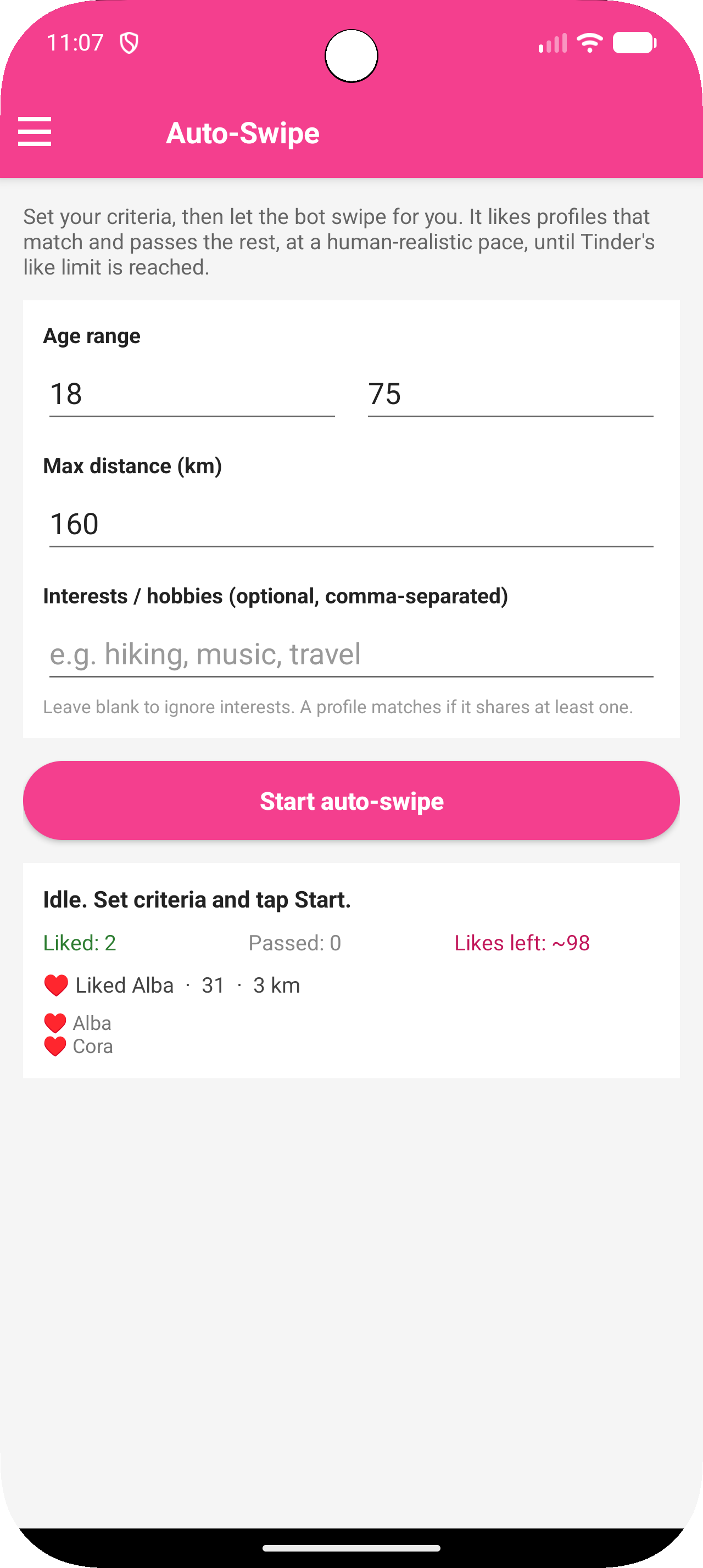
I'll be upfront. I build a free Tinder companion app for Android called Spoofy. It falls in the API companion category, captures your session token through Tinder's own login flow, stores everything locally, and is designed around respecting Tinder's rate limits rather than fighting them. You can find it at sspoofy.com.
It's one of a handful of tools in this category and I don't claim it's the only one. The criteria above (signed APK, no password collection, no accessibility permission, transparent about what data leaves your device) are the things to check whatever you pick.
If you've been frustrated by the official app's manual swiping pace and you want to try the API companion approach, give it a look. If you find something else that meets the same criteria and you prefer it, that's also fine. The point of this post isn't to push one tool, it's to help you avoid the dozen scammy ones that will show up first in search.
Related reading
If you came here looking specifically for ways to swipe past Tinder's daily limit, the post on Tinder unlimited likes APKs covers what genuinely works versus what gets your account banned.
If you're trying to see who already liked you without paying for Gold, the guide to seeing your Likes You list without Gold walks through the realistic options.
And if you're hitting the rate limit and want to know whether any tool can actually bypass it, the post on Tinder cooldowns explains why client-side bypasses don't work and what does.
Comments
Loading comments…