
For most users, Tinder does not show a list of the people you liked. You can see your matches, and on some paid plans who liked you, but there is no “my likes” page for profiles that haven’t liked you back. There are a few workarounds, plus a simple way to keep your own like history from now on.
What Tinder shows you
Here is what you can normally see in Tinder:
- Matches: everyone you liked who also liked you. They appear in your messages.
- Likes you (on some paid plans): people who have liked you. Free users usually see a blurred grid and a count. More in see who liked you on Tinder.
- Your own likes: for most users, not available. Once you swipe right on someone who hasn’t liked you back, they disappear from your screen.
Tinder has experimented with features over the years, and what is offered can vary by country and plan. If you are unsure, check your app’s Settings and the Likes tab. But don’t expect to find a full list of your past right swipes.
Why people want a like history
It is a common wish. Maybe you:
- Liked someone and want to remember who they were.
- Think you liked someone by mistake.
- Want to know whether your likes are going to the right kind of profiles.
- Are curious how many likes turn into matches.
Workarounds that actually work
1. Request your Tinder data
Tinder lets you request a copy of your account data from its website (look for a data request option in Tinder’s help or privacy pages). The download can include usage numbers, such as how many swipes you made per day, plus your messages. It typically does not list the profiles you liked by name, so it is better for stats than for finding a person.
2. Keep notes as you go
Low-tech but reliable. If someone stands out, take a quick note of their first name, age and one detail. Avoid screenshotting profiles to share with others, since that is a privacy issue for them.
3. Wait to see if they show up again
Sometimes a profile you liked reappears in your recommendations, especially if neither of you has acted on it in a while. It is not guaranteed and you can’t control it.
4. Use the rewind if you catch it immediately
If you swipe and instantly regret it, paid tiers have offered a rewind for your last swipe. It only works on the most recent card, so it is not a history.
Can you take back a like?
Not really. An older like stays in place until the other person passes or likes you back. If you match with someone you liked by mistake, you can simply unmatch. They will not get a message explaining why.
How Spoofy helps
Spoofy is a free companion app that works with your existing Tinder account. It is not affiliated with Tinder. Its Like history keeps a list of everyone you liked or super liked through Spoofy, so you can scroll back and see who you swiped right on.
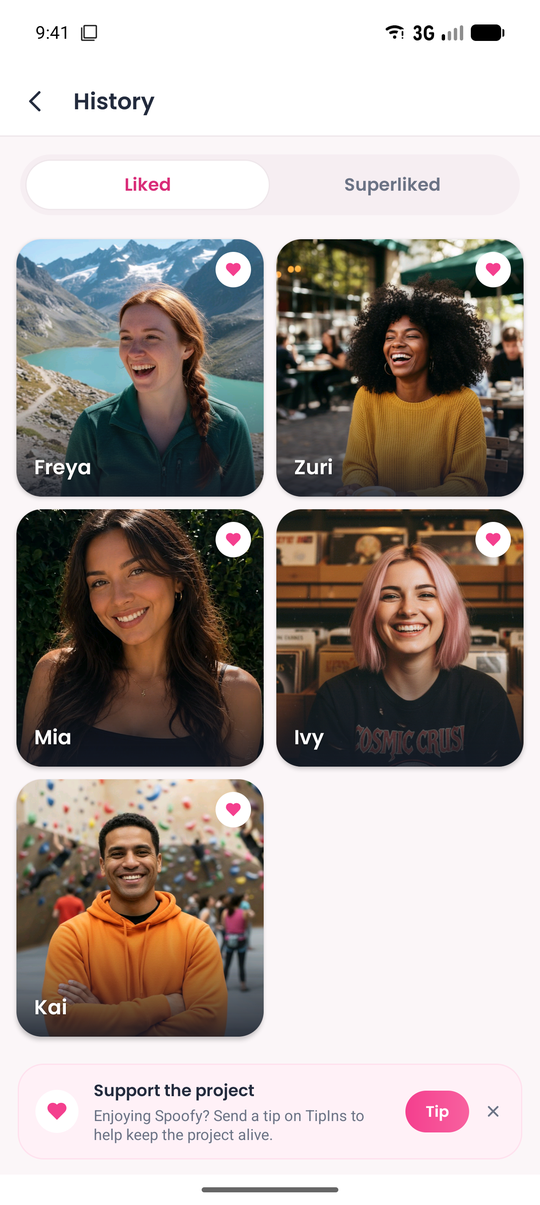
An honest note: Like history only covers likes made through Spoofy. It can’t recover likes you made earlier in the Tinder app. If you want a full record going forward, do your liking in Spoofy.
Some other tools pair well with it:
- Undo and Second look: undo your last pass, or look again at everyone you skipped, so a mis-swipe to the left isn’t final either.
- Profile Search: find someone in your current recommendations by first name and age. See find someone on Tinder by name for what it can and can’t do.
- Insights: weekly likes, matches and streaks, so you can see how many of your likes become matches.
- Multi-Liker: see a grid of recommendations and like several in one tap. Each one lands in your Like history.
Spoofy does not give extra likes. Tinder’s free like limit still applies, and Spoofy shows how many you have left. If you keep running into that wall, see Tinder out of likes. You sign in with your normal Tinder login, Spoofy never stores your password, and every like shows up in Tinder as usual. It runs as an Android APK and as a web app at app.sspoofy.com in any browser.
The bottom line
Tinder doesn’t give most users a list of who they liked. Your options are a data request for stats, your own notes, or a tool that keeps a record as you go. If knowing who you liked matters to you, start keeping a history now, because past likes can’t be recovered.