
A Super Like is a stronger version of a normal like on Tinder. You send it by swiping up or tapping the blue star, and the other person sees that you Super Liked them before they decide to swipe on you. It tells someone you are especially interested, and it puts your profile in front of them in a way that stands out.
Below is how Super Likes work, how many you usually get for free, whether they actually help, and when it makes sense to use one.
How a Super Like works
When you Super Like someone:
- They are told before they swipe. Your profile card typically shows up with a blue star or blue border, so they know it is a Super Like and not a regular like.
- Your profile is more likely to be seen. Tinder generally gives Super Likes more visibility in the other person’s stack.
- If they like you back, you match as usual. If they swipe left, nothing happens and you are not notified.
On the higher paid tiers, Tinder has also offered the option to add a short message to a Super Like, so the person reads a note from you before matching. That is not available on free accounts in most markets.
How many Super Likes free users get
Tinder changes its limits from time to time and they can differ by country and account. On most free accounts, a small allowance is common, often reported as one free Super Like per day. Paid tiers usually include a few more per week, and you can buy extra Super Likes individually.
To see what you have, look at the blue star on the swipe screen in your Tinder app. If it is greyed out or shows a timer, you have used your free one for now.
Do Super Likes actually work?
Tinder has said publicly that Super Likes are more likely to turn into matches than ordinary likes. That makes sense: the other person gets an extra signal that you are interested, and your profile shows up in a more noticeable way.
But a Super Like does not change the fundamentals. If someone would not have liked your profile anyway, a blue star is unlikely to change their mind. Some people also find Super Likes a bit intense, especially from someone they know nothing about.
In practice, a Super Like works best when:
- Your profile is already solid (good photos, a bio with something to reply to).
- You send it to someone who is a genuine fit, not just the most attractive person in your stack.
- There is a reason you stand out to them, for example a shared interest from their bio.
If you are not getting many matches in general, start with your profile. Our guide on how to get more matches is a better first step than spending Super Likes.
When to use a Super Like
Use it on someone who is clearly a good match
The best Super Likes go to people whose bios and photos tell you that you would get along. Shared hobbies, the same sense of humour, a dog you would love to meet. The more specific the fit, the better.
Use it on profiles that seem popular
People with very busy stacks may never get to your normal like. A Super Like pushes you higher up and makes it more likely they at least see your profile.
Use it when you will be around to reply
If they match with you, they may message quickly. Being online and replying while the interest is fresh makes a real difference. Having a good first line ready helps, so take a look at Tinder opening lines if you tend to freeze.
Do not waste it by accident
Accidental Super Likes from a stray upward swipe are common. If you are swiping quickly, slow down near the top of the card.
Super Like etiquette
- Do not Super Like everyone. It loses its meaning, and you will run out anyway.
- Mention something specific when you match. You signalled strong interest, so follow it with a message that shows you actually read their profile.
- If they do not match, move on. You will not be notified either way, and that is fine.
Keeping track of who you Super Liked
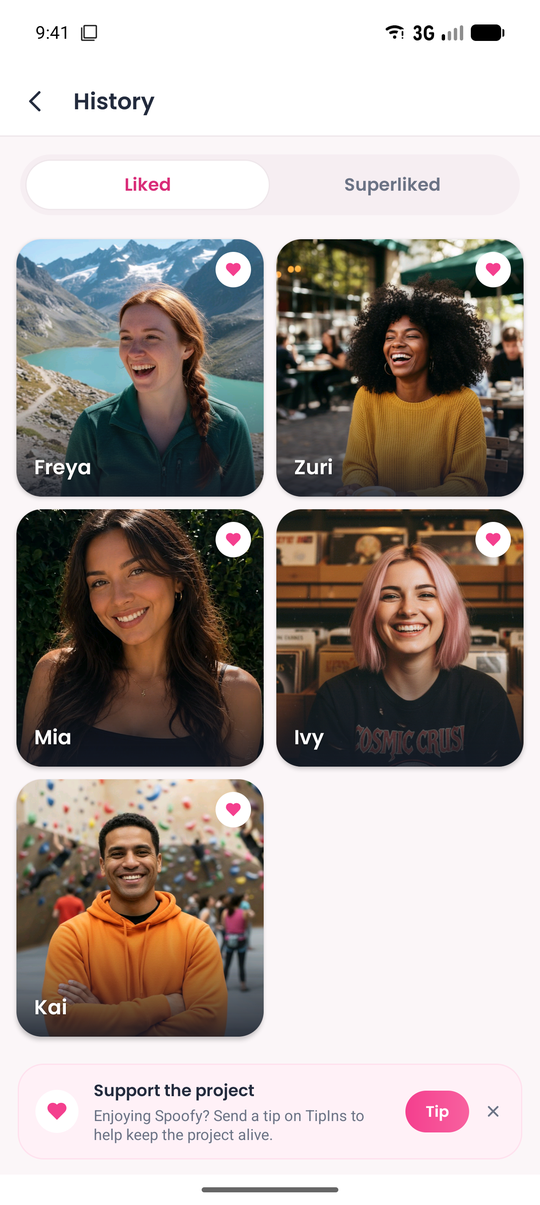
Tinder itself does not give free users an easy list of everyone they have liked or Super Liked. That can make it hard to remember who you used your Super Likes on, or to see whether they ever turned into matches.
Spoofy, a free companion app for Tinder, keeps a Like history with everyone you liked or Super Liked through the app, so you can look back at them later. It also shows how many likes you have left and sends an alert when they refill. Spoofy does not give you extra Super Likes or remove Tinder’s limits; it just makes the ones you have easier to keep track of. You can read more in our guide on seeing who you liked on Tinder.
The short version
A Super Like is a way to say “I am really interested” before the other person swipes. Free accounts usually get a small number, often one per day. They help most when your profile is already good and you send them to someone who genuinely fits. Use them deliberately, be ready to reply, and they can be one of the most useful free tools Tinder gives you.