
Most people get more matches on Tinder by fixing three things: a clear first photo, a short bio that gives people something to reply to, and liking selectively instead of right-swiping everyone. Settings and timing help too, but they can’t rescue a weak profile. Below is a practical plan, in the order that tends to make the biggest difference.
Start with your photos
Your first photo decides most swipes. People make a call in a second or two, usually before they open your bio.
A good lead photo shows your face clearly, on its own, in decent light. No sunglasses, no group, no heavy filter. Smiling helps more than most people expect. After that, add variety: a full-body shot, something that shows a hobby, one with friends where you’re easy to spot, maybe a pet or a trip.
Four to six photos is plenty. Cut anything blurry, very old or near-identical to another shot. If you want a full breakdown, read our guide to the best Tinder photos.
Write a bio that invites a message
An empty bio costs you matches, especially with people who swipe carefully. You don’t need a paragraph. Two or three lines are enough if they contain something specific.
Specific beats generic every time. “I love travel and good food” describes almost everyone. “Currently ranking every ramen place in town, 11 down” gives someone a reason to write. A light question or a small challenge at the end makes the first message easier for the other person.
Skip lists of things you don’t want. They read as negative, even when you mean well. For examples by style, see our Tinder bio ideas.
Like selectively, not everyone
Right-swiping every profile feels efficient, but it tends to backfire. You end up with matches you aren’t interested in, conversations that go nowhere, and it is widely believed that Tinder shows profiles less often when they like nearly everyone. Tinder doesn’t publish exactly how its ranking works, so treat that as a reasonable caution rather than a fact.
The bigger issue is simple: free accounts have a limited number of likes. Around 100 likes per 12 hours is commonly reported, though it varies. Spending them on people you’d actually message gives you better matches, not just more.
A few habits that help:
- Read the bio before liking, at least briefly.
- Pass on profiles with one photo and no bio if you want real conversations.
- Use your Super Like (most free accounts get one a day) on someone you really like, not at random.
Be active at the right times
Tinder favors people who use the app. Opening it regularly, replying to messages and keeping your profile fresh all seem to help your visibility.
Evenings are usually the busiest period, and Sunday evening is often mentioned as a peak. You don’t need to plan your week around it. Just check in most days instead of swiping hard once a month.
Small updates help too. Swapping your first photo or rewriting a line in your bio gives you a fresh start with people who may have passed on you before.
Check your settings
Before you change anything else, open Settings in your Tinder app and look at:
- Distance. In a small town, a tight radius means you run out of people quickly. Widen it a bit.
- Age range. A very narrow range shrinks your pool more than you think.
- Show me / discovery. Make sure your profile is visible and set to the people you want to meet.
- Profile details. Filling in job, school or interests gives people more to go on. Photo verification, where available, can also make people more comfortable liking you.
If you’ve done all this and still see nothing, our guide on no matches on Tinder walks through the less obvious causes.
A quick profile checklist
Run through this before your next session:
- First photo: just you, face clearly visible, good light, smiling.
- At least four photos, with one full-body and one doing something.
- No sunglasses or hats in most shots, no heavy filters.
- A bio of two or three lines with one specific detail.
- Something easy to reply to, like a question or a strong opinion.
- Distance and age range wide enough for your area.
- Profile visible in discovery.
- A plan to open the app most days and reply to matches within a day.
Reply fast and open well
Matches that sit unanswered fade. Many conversations die simply because nobody wrote first. Send a message within a day, and make it about something on their profile. Our guide on what to say after a match has examples that work.
How Spoofy helps
Spoofy is a free companion app that works with your existing Tinder account. It doesn’t give you extra likes or change your location, but it can help you use what you have more carefully.
- Multi-Liker shows a grid of recommendations at once. You can flick through each person’s photos and like the ones you pick in one tap, which makes selective liking much faster.
- Smart filters let you skip profiles without a bio, with fewer than three photos, or that haven’t been active recently. You can also limit by distance or hide bios containing certain phrases.
- Insights shows your weekly likes, matches and best opener, plus a checklist for your own profile: enough photos, a bio long enough to reply to, interests, “Looking for” and job or school.
- Alerts tell you when your likes refill, so you don’t waste time opening the app when you’re out.
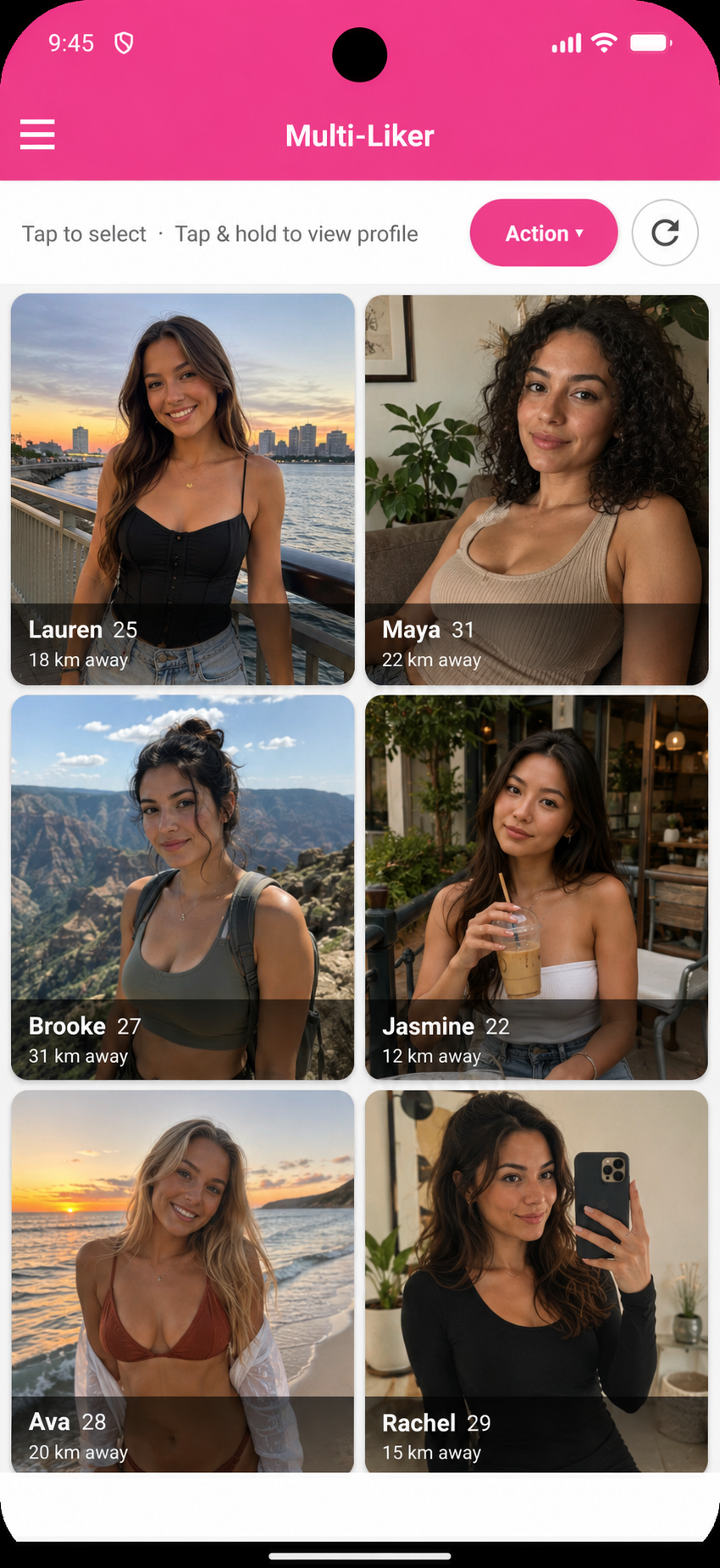
Everything you do in Spoofy shows up in Tinder as usual, and using any third-party app is your own choice. The profile work above matters more than any tool, so start there.